Path Analysis
Path Analysis simulates shortest paths between source and destination segments. It is separate from the Analysis module and supports manual source/destination input or OD table input.
Path Types
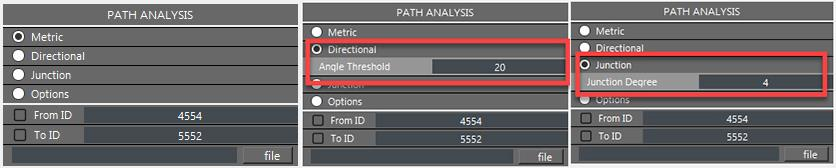
Metric, directional, and junction path modes.
- Metric
Shortest path by metric length. No additional parameter is required.
- Directional
Shortest path by directional changes. Set
Angle Threshold.- Junction
Shortest path by junction counts. Set
Junction Degree.
Optional Path Attributes
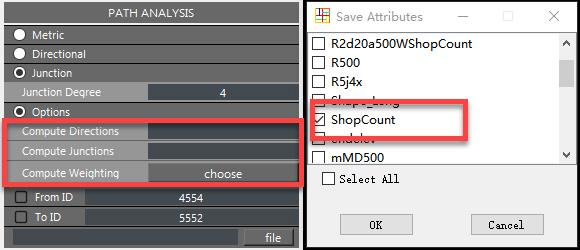
Path option panel.
Options can compute:
accumulated directional changes
accumulated junction counts
accumulated weighted attributes from selected numeric fields
Keep option parameters consistent with the selected path mode to avoid ambiguous interpretation.
Source And Destination Input
- Manual input
Enter segment IDs in
From IDandTO ID, or select segments in the map and transfer their IDs into the fields.- OD table input
Use a CSV or TXT file with two columns. The first column is the origin segment ID, and the second column is the destination segment ID. Column names are not required.
Results
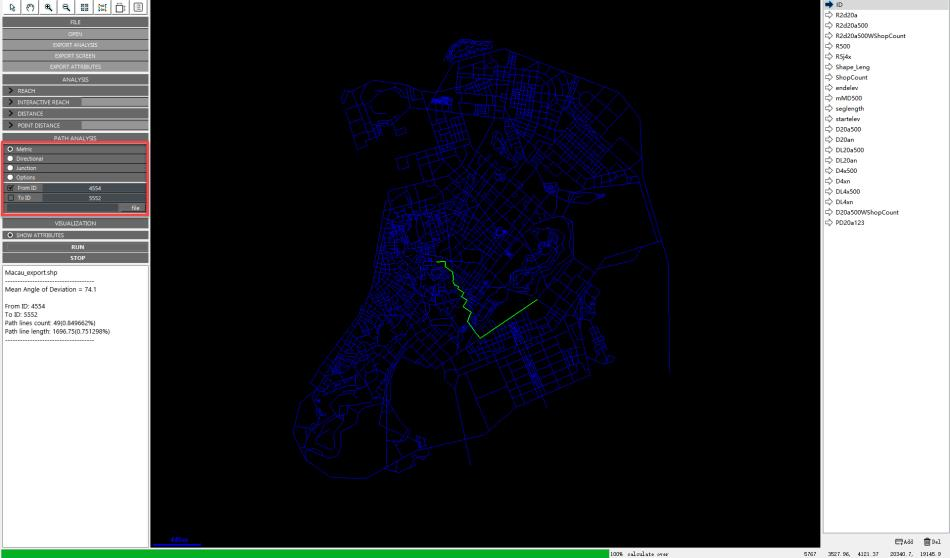
Manual path-analysis result.
Manual input returns temporary summary data and draws a Path Analysis layer. OD table input does not draw every path. Instead, it writes Path count to the network and creates a CSV with distance and path composition for each OD pair.